[공지] SMS114.CO.KR 바로가기
www.sms114.co.kr
👉 텔레그램 상담 바로가기
[SSL적용] EC2 Amazone Free SSL 설치 ( Let’s encrypt )
EC2 Amazon 무료 Lets encrypt SSL적용 순서
사이트 주소 : https://letsencrypt.org/ko/
// root 권한 획득
sudo su

/*
Openssl :SSL/TLS 통신과 암호화 관련 기능 제공 모듈 설치
mod_ssl : Apache 웹 서버용 SSL 모듈 설치
*/
dnf install openssl mod_ssl

/*
python3 : Python 3 버전을 설치, Python 기반 스크립트나 도구를 실행하기 위함
augeas-libs : Certbot 같은 도구가 설정 파일을 수정할 때 사용하기 위함.
pip : Python 라이브러리나 모듈을 쉽게 설치하고 관리하는 기능
*/
sudo dnf install -y python3 augeas-libs pip

// certbot 이 python 에 의존해 돌기 때문에 python도 설치해야 함.
sudo python3 -m venv /opt/certbot/

ls /opt/certbot
sudo /opt/certbot/bin/pip install --upgrade pip

sudo /opt/certbot/bin/pip install certbot

sudo ln -s /opt/certbot/bin/certbot /usr/bin/certbot

위 명령어 이후,
 certbot
치면, 아래처럼 certbot의 명령이 어떤 식으로든 먹었다는 것을 인지할 수 있다.

//우선 httpd 를 stop 시켜놓는다.
sudo systemctl stop httpd

// Lets Encrypt 인증서만을 발급받기 위한 command
// certonly: "인증서만 발급받겠다"는 의미. 웹 서버 설정을 자동으로 수정하지 않고, 인증서만.
// --standalone: Certbot이 자체적으로 임시 웹 서버를 실행해서 도메인 소유권을 확인하는 방식을 사용하겠다는 뜻.
 sudo certbot certonly --standalone
-------
  1. 이메일 입력
  2. ACME server에 등록하는 것을 동의하는가? 'Y'
  3. "첫 번째 인증서가 성공적으로 발급되면, Let's Encrypt 프로젝트의 설립 파트너이자 Certbot을 개발한 비영리 단체인 전자 프런티어 재단(EFF)과 이메일 주소를 공유할 의향이 있나요? 저희는 인터넷 암호화, EFF 소식, 캠페인, 그리고 디지털 자유를 지원하는 방법에 대해 이메일을 보내고자 합니다.""
     -> 'N'
  4.도메인 입력 : www.naver.com.

/*
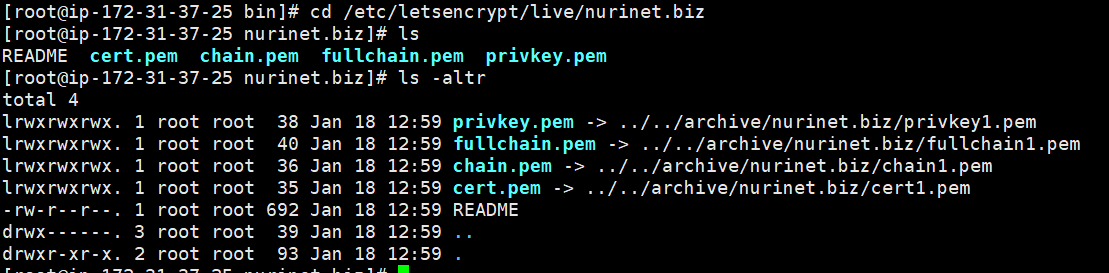
Certificate is saved at: /etc/letsencrypt/live/nurinet.biz/fullchain.pem
Key is saved at:         /etc/letsencrypt/live/nurinet.biz/privkey.pem
*/

//httpd 서버 stop
 sudo systemctl stop httpd
//httpd 서버 start
 sudo systemctl start httpd

//아래, ssl.conf 에 <VirtualHost text 삽입처리
 sudo vi /etc/httpd/conf.d/ssl.conf
<VirtualHost *:443>
   DocumentRoot "/var/www/html"
   ServerAlias nurinet.biz

   SSLEngine on
   SSLCertificateFile /etc/letsencrypt/live/nurinet.biz/cert.pem
   SSLCertificateKeyFile /etc/letsencrypt/live/nurinet.biz/privkey.pem
   SSLCertificateChainFile /etc/letsencrypt/live/nurinet.biz/chain.pem
</VirtualHost>
httpd 서버 재시작
//httpd 서버 재시작
 sudo systemctl restart httpd

// 이 시점에서 크롬, nurinet.biz의 캐쉬를 삭제하고 다시 접속하면, 안전한 접속이라는 메시지를 확인할 수 있다.

 sudo dnf install cronie-noanacron

 sudo vi /etc/crontab
/etc/crontab 은 시스템 전체에서 공통으로 사용하는 크론 설정이다.
저장위치는 /etc/crontab 파일이며, 시스템 전반적 동작하는 작업을 설정할 때, 여기서 crontab 설정을 하면 된다. 그래서 아래와 같이, 사용자 지정 필드를 꼭 지정해서 기술해야 한다 ( 누구의 권한으로 실행될지 지정)
그래서 파일 형식은 이렇듯 약간 다르다.
* * * * * USER COMMAND
```bash 실제예 0 2 * * * root /path/to/system-maintenance.sh
즉, 아래와 같이 설

```bash
30 1 * * 2 root /usr/bin/certbot renew --post-hook "systemctl reload httpd"

* certbot renew: SSL 인증서를 갱신.
* --post-hook: 인증서 갱신 후 Apache 웹 서버(httpd)를 다시 로드.
위 크론 작업은 매주 화요일 새벽 1시 30분에,
root사용자로 다음 명령어를 실행하게 됨.
크론탭 Tip
표현식 해석
30 1 * * 2 root /usr/bin/certbot renew --post-hook "systemctl reload httpd"
30(분): 매 시간의 30분에 실행.1(시): 새벽 1시에 실행.\*(일): 특정 날짜 조건 없음 (매일 실행 가능).\*(월): 특정 월 조건 없음 (매월 실행 가능).2(요일): 화요일(2)에만 실행.
원본문서============================================================================= 원본 문서
Amazon Linux 2023 SSL(Let’s encrypt) 적용
원본문서============================================================================= 원본 문서
sudo su
dnf install openssl mod_ssl
sudo dnf install -y python3 augeas-libs pip
sudo python3 -m venv /opt/certbot/
ls /opt/certbot
sudo /opt/certbot/bin/pip install –upgrade pip
sudo /opt/certbot/bin/pip install certbot
sudo ln -s /opt/certbot/bin/certbot /usr/bin/certbot
sudo systemctl stop httpd
sudo certbot certonly –standalone
이메일입력, Y, N, 도메인입력
sudo systemctl start httpd
sudo vi /etc/httpd/conf.d/ssl.conf
<VirtualHost *:443> DocumentRoot “/var/www/html” ServerAlias ttj2.tripbay.net
SSLEngine on SSLCertificateFile /etc/letsencrypt/live/ttj2.tripbay.net/cert.pem SSLCertificateKeyFile /etc/letsencrypt/live/ttj2.tripbay.net/privkey.pem SSLCertificateChainFile /etc/letsencrypt/live/ttj2.tripbay.net/chain.pem </VirtualHost>
sudo systemctl restart httpd
sudo dnf install cronie-noanacron
sudo vi /etc/crontab
Shell
복사
30 1 * * 2 root /usr/bin/certbot renew –post-hook “systemctl reload httpd”
댓글남기기