[공지] SMS114.CO.KR 바로가기
www.sms114.co.kr
👉 텔레그램 상담 바로가기
[platform] 데이터베이스셋팅
1. HeidiSQL
-
HeidiSQL 에서 해당 database 생성.
-
EC2 linux 의 /ci/config/database.php 에서 아래 값 셋팅
$active_group = 'default';

$query_builder = TRUE;

$db['default'] = array(
  'dsn'  => '',
  'hostname' => 'localhost',
  'username' => 'root',
  'password' => 'xxxxx',
  'database' => 'log_v',
  'dbdriver' => 'mysqli',
  'dbprefix' => '',
  'pconnect' => FALSE,
  'db_debug' => (ENVIRONMENT !== 'production'),
  'cache_on' => FALSE,
  'cachedir' => '',
  'char_set' => 'utf8',
  'dbcollat' => 'utf8mb4_general_ci',
  'swap_pre' => '',
  'encrypt' => FALSE,
  'compress' => FALSE,
  'stricton' => FALSE,
  'failover' => array(),
  'save_queries' => TRUE
);
- db 설정은 위 셋팅만으로 완료.
2. 사이트 구조와 기능
- 사이트구조 = 페이지 = 컨트롤러 + View + ajax
- 메인,피드, 사용자의 페이지, 글작성
- 기능 = API = 컨트롤러+모델
- 회원가입, 로그인, 로그인체크, 글목록, 글작성, 글수정, 사용자조회
codeIgnite !!!
아파치 서버에 코드이그나이트를 올려서 사용한다.
첫째로,
prod3.nurinet.biz 로 DNS 를 정했다면,
/etc/httpd/conf 또는 /etc/httpd/conf.d 에서
설정 파일, .conf 를 찾는다.
설치후 가장 기본적인 .conf 파일은 /etc/httpd/conf/httpd.conf 이며,
이것은 :80 의 Default 파일이다. 이것이 가장 우선 순위의 reading .conf 파일이다.
추가되는 파일들은 conf.d 에 설정해주면 되는데, 예를 들어, prod3.nurinet.biz 라면,
도메인명 prod3 의 conf 를 prod3.nurinet.biz.conf 로 만들고 설정한다.
<VirtualHost *:80>
ServerAdmin innolifesxx@gmail.com
ServerName prod3.nurinet.biz
ServerAlias prod3.nurinet.biz
DocumentRoot "/var/www/prod3/ci"

# Logging
ErrorLog /var/log/httpd/prod3_nurinet_error.log
CustomLog /var/log/httpd/prod3_access.log combined

# Optional settings
<Directory "/var/www/prod3/ci">
    AllowOverride All
    Require all granted
    DirectoryIndex index.php
</Directory>

#RewriteEngine On
#RewriteRule ^$ /ci/ [L,R=302]
#RewriteCond %{HTTPS} off
#RewriteRule ^(.)$ https://%{HTTP_HOST}%{REQUEST_URI} [L,R=301]
</VirtualHost>
코드이그나이트 의 경우, /var/www/prod3/ci 하위의 index.php를 찾게 될 것이다.
코드이그나잇 /application/config/ 폴더에 있는 routes.php 를 보면,
$route['default_controller'] = 'main';
$route['404_override'] = '';
$route['translate_uri_dashes'] = FALSE;

$route['(:any)'] = 'main';
$route['(:any)/(:any)'] = 'welcome';
이다. 즉 ‘default_controller’ 가 main 이므로,
/application/controllers 폴더 하위의 main.php 를 찾는다.
main.php를 열면,
<!DOCTYPE html>
<html lang="en">
<head>
    <meta charset="UTF-8">
    <meta name="viewport" content="width=device-width, initial-scale=1.0">
    <title>메인</title>
    <script src="https://cdnjs.cloudflare.com/ajax/libs/jquery/3.7.1/jquery.min.js" integrity="sha512-v2CJ7UaYy4JwqLDIrZUI/4hqeoQieOmAZNXBeQyjo21dadnwR+8ZaIJVT8EE2iyI61OV8e6M8PP2/4hpQINQ/g==" crossorigin="anonymous" referrerpolicy="no-referrer"></script>
</head>

<body>
    <div class="box"> 안녕하세요 !! 여기는 main.php 입니다.</div>
    <script>
        $(document).ready(function(){
            $ajax({
                url: 'http://localhost:8080/ci/index.php/main',
                type: 'post',
                data: {
                    'name': '홍길동'
                },
                success: function(data){
                    $('.box').html(data);
                }
            });
        });
    </script>


</body>
</html>
즉, http://prod3.nurinet.biz 하면, 아래 화면을 대할 수 있다.
안녕하세요 !! 여기는 main.php 입니다.
알겠지?
****결론
httpd 를 설치하고 이그나이트 프레임워크를 올려 두었다면,
conf.d 의 특정명.conf 를 찾고, 그곳에서의 첫 index.html, index.php 를 찾는다.
하지만 이그나이트에서는 routs.php 를 찾아서 컨트롤러의 default 콘트롤러에서 가르키는 .php 파일을 찾는다
$route[‘default_controller’] = ‘main’;
끝.
추가
코드이그나이트에서,
-
http://prod3.nurinet.biz/main 호출 시,
-
물론, routes.php 에서 default_controller 는 ‘main 이지만, 호출 uri 가 /main 이므로controller 의 Main.php 를 먼저 찾는다.
Main.php
<?php defined('BASEPATH') OR exit('No direct script access allowed'); class Main extends CI_Controller { public function index() { $this->load->view('main'); } } -
위, Main 클래스 index() 는 default 호출이기에 http://prod3.nurinet.biz/main 호출 시, index() 함수를 지정하지 않아도 views 폴더의 main.php 를 load 하게 된다.
-
만약, Main.php가 아래와 같을 경우,
<?php
defined('BASEPATH') OR exit('No direct script access allowed');

class Main extends CI_Controller {

	public function index()
	{
		$this->load->view('main');
	}

    public function test1(){
        echo 'aaaaaa';
    }
}
http://prod3.nurinet.biz/main 하면 /views/main.php 을 호출하게 되고, http://prod3.nurinet.biz/main/test1 하면 위 test1() 함수를 load 하여 ‘aaaaaa’가 찍히게 된다.
-
추가2
http://prod3.nurinet.biz/ 호출 시,
-
/application/config/routes.php 에서 $route[‘default_controller’] = ‘main’;
-
/application/controllers/Main.php
- Main.php 에서 index() 호출
public function index() { $this->load->view('main'); } - /application/views/main.php 호출, 아래 코드,
<!DOCTYPE html>
<html lang="en">
<head>
    <meta charset="UTF-8">
    <meta name="viewport" content="width=device-width, initial-scale=1.0">
    <title>메인</title>
    <script src="https://cdnjs.cloudflare.com/ajax/libs/jquery/3.7.1/jquery.min.js" integrity="sha512-v2CJ7UaYy4JwqLDIrZUI/4hqeoQieOmAZNXBeQyjo21dadnwR+8ZaIJVT8EE2iyI61OV8e6M8PP2/4hpQINQ/g==" crossorigin="anonymous" referrerpolicy="no-referrer"></script>
</head>

<body>
    <div class="box"> 안녕하세요 !! 여기는 main.php 입니다.</div>
    <script>
        $(document).ready(function(){
            console.log('호출 전');
            setTimeout(() => {
                $.ajax({
                    url: '/api/test2',          // 호출할 API URL
                    type: 'POST',               // HTTP 메서드 (GET, POST, 등)
                    //dataType: 'json',          // 응답 데이터 형식 (json, text, 등)
                    success: function(response) {
                        // 호출 성공 시 콘솔에 출력
                        console.log("successssssssssssssss");
                        console.log('Success:', response);
                        $('.box').html(response);

                    },
                    error: function(xhr, status, error) {
                        // 호출 실패 시 에러 로그 출력
                        console.error("Error:", error);
                    }
                });

            }, 1500);
        });
    </script>
</body>
</html>
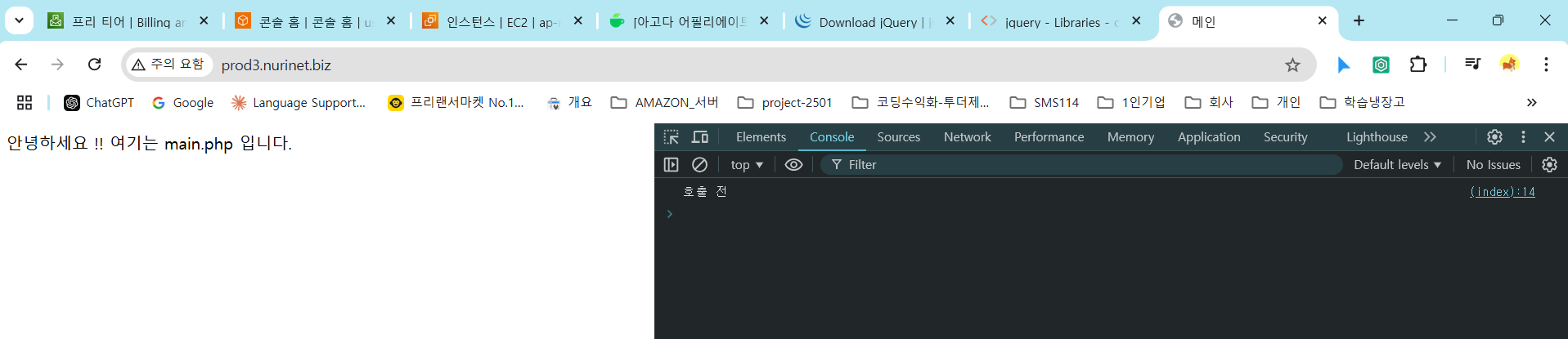
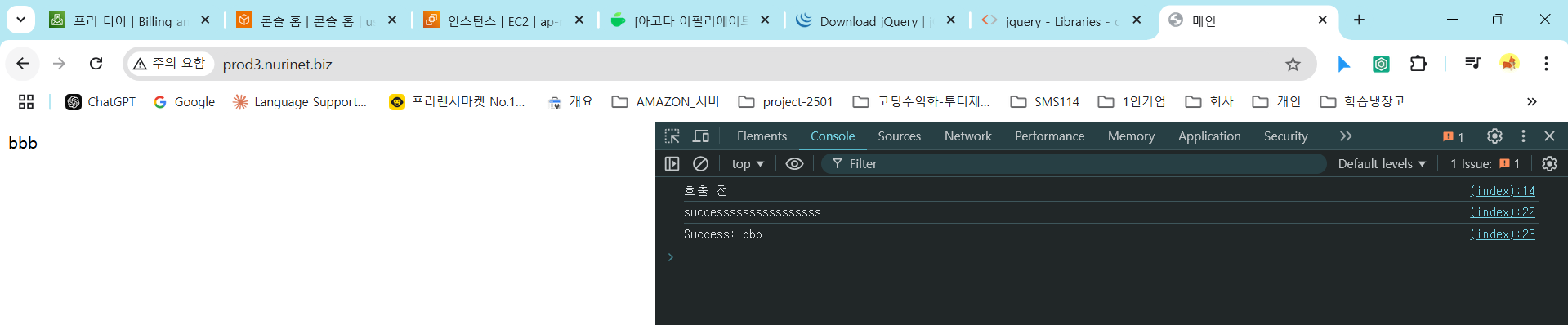
위 코드에서, ““안녕하세요 !! 여기는 main.php 입니다.”” c출력후, 1.5초 후에 /api/test2 의 결과값인 ‘bbb’를 “.box class” 로 결과값을 print 한다. 그래서, 최종 화면 결과값은 ‘bbb’
**http://prod3.nurinet.biz 호출 직전,**
**http://prod3.nurinet.biz 호출 직후,**
댓글남기기